Introduction to e-TDS and e-TCS:
Electronic Tax Deducted at Source (e-TDS) and Electronic Tax Collected at Source (e-TCS) are the processes that allow for electronic filing of TDS and TCS statements or returns respectively. These electronic processes simplify the compliances for deductors and collectors regarding their tax obligations.
The Return Preparation Utility (RPU) and File Validation Utility (FVU) are essential tools designed to assist in the preparation and validation of these returns. They help to ensure that the returns are prepared correctly and meet the required format before submission to the tax authorities.
Overview of RPU Version 5.1 and FVU Version 8.6
Latest version of RPU is Version 5.1 and FVU version is 8.6, both released on Oct 4Th ,2024. These versions facilitate the preparation of regular and correction quarterly e-TDS/TCS returns and suitable for filings for Financial Year 2007-08 onwards for Forms 24Q, 26Q, 27Q, and 27EQ.
You can download the latest version of the RPU even if you have older version installed as both the older and latest versions can coexist on your system since they are independent Java-based utilities. However, it is advisable to backed up any files or returns created with older RPU before making the switch. Always use the latest RPU for current filings to ensure compliance with the most recent rules and regulations made under Income Tax Act.
Key Updates in RPU Version 5.1 and FVU Version 8.6
The following are the additions / updates made to the prior versions:
- Addition of new Nature of Remittance under Annexure I (Deductee details) for Form 27Q pertains to F.Y 2024-25 Q2 onwards.
- Introduces updated remittance codes under Form 27Q, including codes for sections:
- 196B: Long-Term Capital Gains arising from Transfer of units referred to in section 115AB codes of Nature of Remittance 71 in Form 27Q
- 196C: Long-Term Capital Gains arising from Transfer of units referred to in section 115AB codes of Nature of Remittance 72 in Form 27Q
Moreover, updates in RPU and FVU versions helps in compliance with amendments in Income Tax Department regulations, reducing potential filing errors.
Step-by-Step Guide to Download and Install the Latest RPU Version:
Step1: Go to the official Protean (formerly NSDL e-Gov) TIN website: https://www.protean-tinpan.com/
Upon clicking the above website shows like below
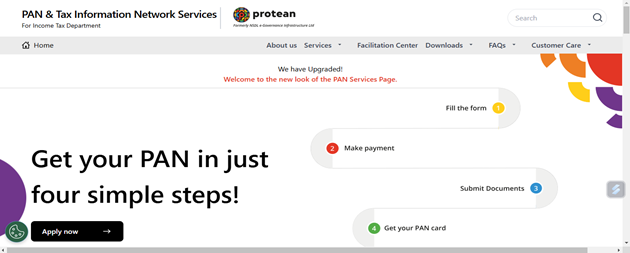
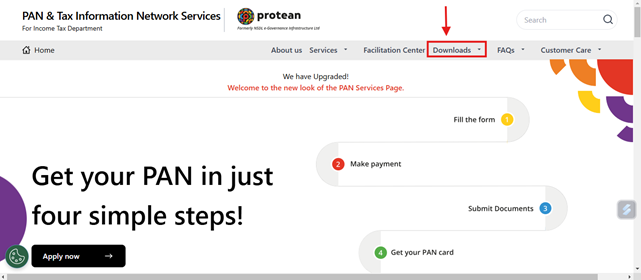
Step2: Go to Downloads Tab (as shown in picture)
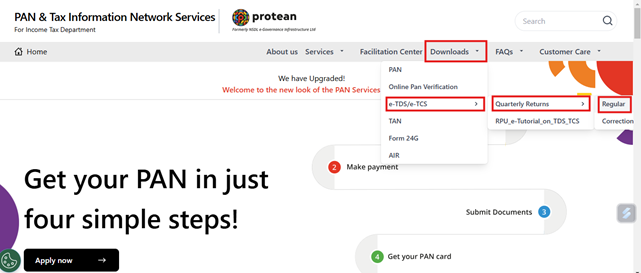
Step3 : In the Downloads tab , navigate to e-TDS/e-TCS section >>> Quarterly returns >>>Regular as shown in the picture with red label.
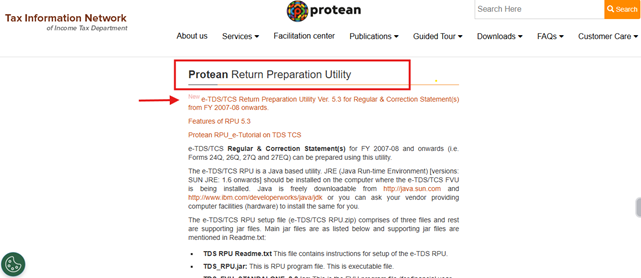
Step4 : Scroll down the page to Protean Return Preparation Utility section and click on the link ( pointed with the arrow mark ) and download in your system.
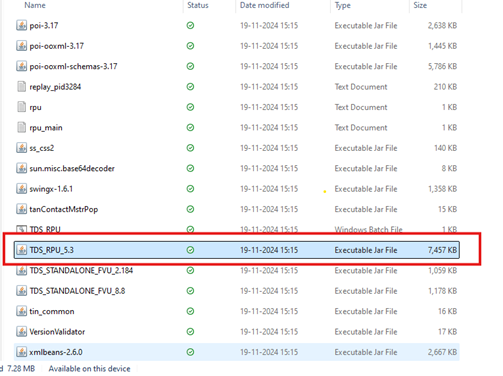
Step5 : Right-click on the zip file and select “Extract All”. Open the extracted folder and Double-click on the TDS_RPU_5.3 (executable.jar file) to launch the utility.
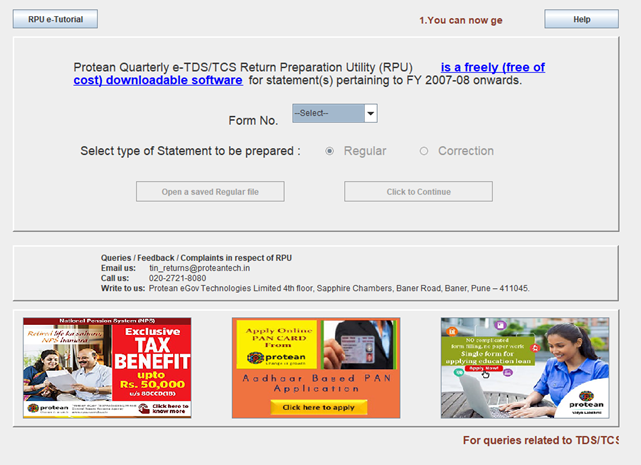
Now your ready to file the TDS / TCS statements with the below interface.
Troubleshooting Common Issues During Installation:
| Sl.No | Issue | Cause | Solution |
| 1 | Installation File Does Not Open | Missing or outdated Java Runtime Environment (JRE) | Ensure (Download/Update) Java latest version is installed on your system and restart your system after installation, then try opening the RPU file again |
| 2 | “File Corrupted” or “Cannot Extract” Errors | Incomplete or corrupted download. | Re-download the RPU zip file from the official Protean-TIN website and Use a trusted extraction tool like WinRAR |
| 3 | Error: “TDS_RPU.jar Not Found” | The JAR file was not extracted or deleted accidentally. | Extract all files from the zip folder to a specific location on your system. |
| 4 | Compatibility Issues | The possibility that systems does not meet the software requirements. | Update your operating system to the latest version. |
| 5 | Generated Files Are Rejected by FVU | Incorrect data entry or outdated version of RPU. | Review the error report generated by the FVU and correct any errors in the RPU and Regenerate the .txt file and revalidate it. |
Finally, if any other issues facing during the Installation of utilities or filing the TDS / TCS statements through utilities contact the Protean TIN Helpdesk : https://www.protean-tinpan.com/customerfeedback#customer-care-forms